오늘은 RSS를 연동하여 타사이트의 정보를 내홈페이지로 가져오는 고급기능입니다.
RSS란 "포털사이트나 블로그와 같이 컨텐츠 업데이트가 자주 일어나는 웹사이트에서 업데이트 된 정보를 자동적으로 쉽게 사용자들에게 제공하기 위한 서비스" [네이버 지식백과]
이런 RSS를 아람스쿨 솔루션에 적용하면 실시간정보를 내 홈페이지에서 실시간으로 보이도록 만들 수 있습니다.
그럼, 시작하겠습니다 !


우선 "농장뉴스"라는 새로운 메뉴를 추가해보겠습니다.
[디자인관리 》 전문가 환경설정 》 네비게이션 마법사]로 이동하여 매니저농장의 하위메뉴를 아래와 같이 "농장뉴스"라는 이름으로 추가합니다.
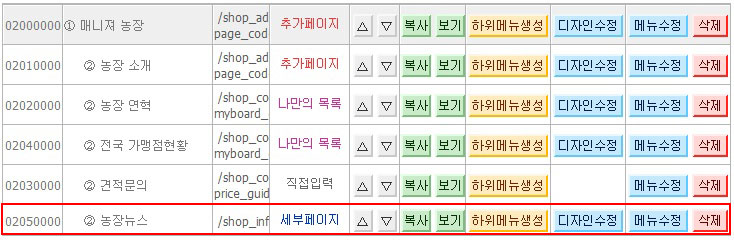

샘플로 사용할 RSS 주소는 http://api.newswire.co.kr/rss/all 입니다.
해당 사이트를 열어서 오른쪽버튼을 눌러 소스보기를 클릭합니다.
소스를 보면 아래와 같이 규칙적으로 반복되는 부분을 찾을 수 있습니다.
※ 해당페이지에서 뉴스기사를 구분해서 소스를 보면 쉽게 찾을 수 있을 것입니다.
<item>
<title> 제목 </title>
<link> 링크 </link>
<category> 카테고리 </category>
<description> 내용 </description>
<pubDate> 날짜 </pubDate>
</item>
<item>
위의 규칙을 이용할 경우 나만의 목록에서 필요한 항목은 제목, 링크, 내용, 날짜가 필요합니다.
[프로그램샵 > 프로그램 환경설정 > 맞춤 게시판 관리]로 이동하여, 아래와 같이 나만의 목록을 추가합니다.
※ 정렬순서에서 "4번째 항목"은 항목명이 날짜이며 내림차순(최신뉴스순)으로 정렬됩니다.
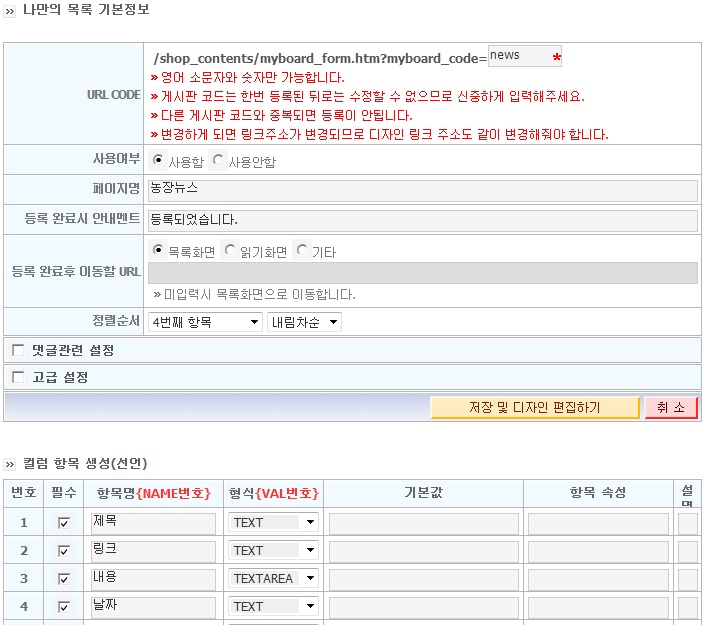

나만의 목록디자인은 리스트화면, 읽기화면, 쓰기화면으로 구성되지만, RSS를 연동할 경우에는 읽기화면과 쓰기화면은 필요가 없기 때문에 리스트화면만 수정합니다.
나만의 목록디자인에서 리스트화면을 아래와 같이 수정해주세요.
① TEXT모드를 클릭합니다.
② 샘플디자인을 기본디자인으로 선택하고 "샘플디자인 소스가져오기"버튼을 클릭하세요
③ 기본소스가 자동으로 삽입됩니다.
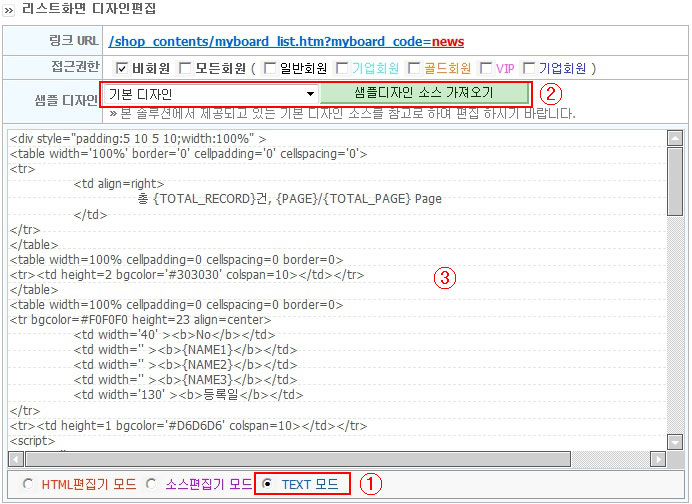
④ 삽입된 소스를 아래와 같이 수정해주세요~ (마지막 미션이니깐.. 이뿌게 꾸며봅시다..ㅋㅋ)
※ 소스에 주석을 삽입하면, 나중에 수정이 쉽답니다.
<style>
.content {font-family:arial,dotum;font-size:12px;color:555555}; <!-- 번호 -->
.content2 {font-family:arial,dotum;font-size:12px;color:888888;text-decoration: none}; <!-- 내용 -->
.content3 {font-family:arial,dotum;font-size:11px;color:555555}; <!-- 출처 -->
.title {font-family:arial,dotum;font-size:13px;color:035dab;font-weight:bold;text-decoration: none}; <!-- 제목 -->
</style>
<br>
<!---------- 타이틀 및 현재위치 -------------->
<table width="740" border="0" cellspacing="0" cellpadding="0">
<tr>
<td><table width="100%" border="0" cellspacing="0" cellpadding="0">
<tr>
<td><font size=3><b>농장뉴스</b></font></td>
<td align="right" valign="bottom">HOME > 매니저농장 > <b>농장뉴스</b></td>
</tr>
</table></td>
</tr>
</table>
<br>
<!---------- 현재페이지 -------------->
<table width='100%' border='0' cellpadding='0' cellspacing='0'>
<tr>
<td align=right class='content'>
총 {TOTAL_RECORD}건, {PAGE}/{TOTAL_PAGE} Page
</td>
</tr>
</table>
<br>
<!---------- 한줄라인 -------------->
<table width=100% cellpadding=0 cellspacing=0 border=0>
<tr><td height=2 bgcolor='#2585d8' colspan=10></td></tr>
</table>
<!------------ 내용 ---------------->
<table width=100% cellpadding=0 cellspacing=0 border=0>
<tr bgcolor=#f5f5f5 height=30 align=center>
<td width='40' class="content" align=center>NO.</td>
<td width='' align=center colspan=2 class="content">RSS 취업뉴스</td>
</tr>
<tr><td height=1 bgcolor='#cccccc' colspan=10></td></tr>
<script>
var str = '';
for(var i =0;i<sm_numbering_arr.length;i++){
sm_numbering = sm_numbering_arr[i]; // 넘버링
sm_read_url = sm_read_url_arr[i]; // 링크주소
sm_reg_date = sm_reg_date_arr[i]; // 날짜 YYYY-MM-DD HH:ii
sm_reg_date2 = sm_reg_date2_arr[i]; // 날짜 YYYY-MM-DD
sm_view_cnt = sm_view_cnt_arr[i]; // 조회수
for(var n=1;n<=35;n++){ // sm_val1 ~ sm_val35
eval("sm_val"+n+" = sm_val"+n+"_arr[i];");
eval("sm_val"+n+"_url = sm_val"+n+"_url_arr[i];"); // 첨부파일이 있다라면.. sm_val_숫자_url 변수로 저장됩니다.
}
str += "<tr style='padding:5'>";
str += "<td align=center class='content'>"+sm_numbering+"</td>";
str += "<td>";
str += " <table width=100% border=0 cellspacing=0 cellpadding=0>";
str += " <tr><td><a href="+sm_val2+" target='_blank'><span class='title'> "+sm_val1+"</span></a></td></tr>";
str += " <tr><td style='padding:5 0 5 0;text-align:justify'>";
str += " <a href="+sm_val2+" target='_blank'><span class='content2'>"+sm_val3+"</span></a>";
str += " </td></tr>";
str += " <tr><td colspan=10 class='content3'>출처 : 뉴스와이어(경제 - 취업 보도자료) </td></tr>";
str += " </table>";
str += "</td></tr>";
str += "<tr><td height=1 bgcolor='#D6D6D6' colspan=10></td></tr>";
}
document.write(str);
</script>
<tr><td height=3 bgcolor='#F7F7F7' colspan=10></td></tr>
</table>
<!------------ 검색 ---------------->
<p align=center>
<FORM NAME='myboard_search_form' METHOD=GET ACTION="" style='margin:0'>
<input type='hidden' name='myboard_code'>
<input type='hidden' name='me_popup'>
<input type='hidden' name='h_search_c'>
<input type='hidden' name='h_search_v'>
<input type='hidden' name='tag_on'>
<select name="keyfield" >
<option value="val1" >제목</option>
<option value="val2" >내용</option>
</select>
<INPUT TYPE=TEXT SIZE=30 NAME=key VALUE="" class='input_a' style='width:150px'>
<input type='submit' value='검색'>
</form>
</p>
<!------------ 페이징 ---------------->
<table width='100%' border='0' cellpadding='0' cellspacing='0'>
<tr>
<td align=center>{PAGE_BLOCK}</td>
</tr>
</table>

마지막으로 RSS연동만 남았네요..
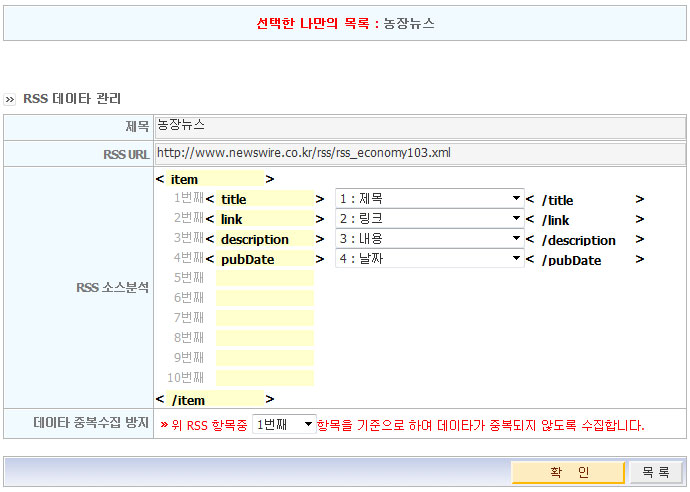
RSS연동에는 링크주소와 아래와 같이 반복되는 부분을 이용할 것입니다.
RSS주소 : http://www.newswire.co.kr/rss/rss_economy103.xml
<item>
<title> 제목 </title>
<link> 링크 </link>
<category> 카테고리 </category>
<description> 내용 </description>
<pubDate> 날짜 </pubDate>
</item>
<item>
[프로그램샵 > 프로그램 환경설정 > 맞춤 게시판 관리]로 이동하여 농장뉴스의 RSS연동 버튼을 클릭합니다.

아래와 같이 신규RSS 등록버튼을 눌러봅시다.
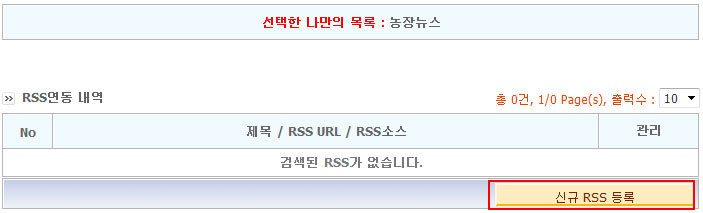
RSS데이타관리에 아래와 같이 입력하고 확인버튼을 클릭합니다.
RSS등록 완료화면에서 실행버튼을 클릭해서 타사이트의 내용을 가져옵니다.
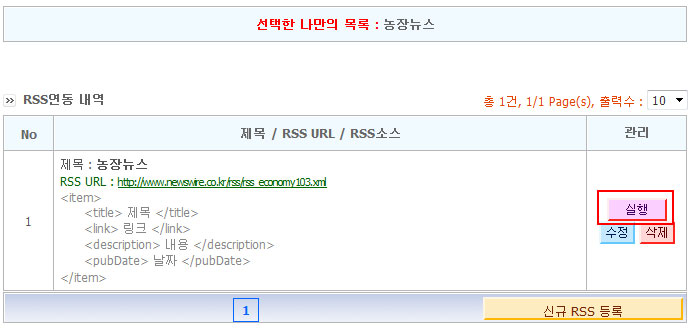
RSS로 연동되어 있으므로 다음부터는 실행버튼을 누르지 않아도 자동으로 연동된 사이트의 내용을 가져오게 됩니다
※ 약 20분 단위로 새로수정이 된답니다.
네비게이션마법사에서 "농장뉴스"를 연결해주세요. (이 부분은 잘 아시리라 생각하므로 생략합니다)
완성화면 : http://uhkr58.aramschool.co.kr/shop_contents/myboard_list.htm?myboard_code=news



















 [응용] SNS(트위터, 미투데이) API 연동 하기
 [응용] 방명록 프로그램 설치 및 수정 방법